- Building a digital assets inventory checklist is about finding footprints through bank statements and physical devices.
- Never attempt to guess passwords or bypass locks. You will likely trigger fraud alerts or permanently erase the data.
- Always prioritize securing the physical devices (phones, laptops) and keeping the phone service active to maintain access to two-factor authentication (2FA).
- Look beyond subscriptions to find hidden financial value in payment wallets (PayPal, Venmo) and monetized platforms (Etsy, Substack, YouTube).
- Organize your findings into a clean inventory table and approach each tech company using their standard bereavement procedures.
The Invisible Estate: Uncovering What Is Hidden Online
In my experience helping executors organize estate files, the biggest panic usually sets in about three weeks after the funeral. That is when the deceased person’s phone locks, auto-renewals start hitting the bank account, and the realization dawns: half of the estate is completely invisible.
We are used to looking for filing cabinets, deed boxes, and mailed bank statements. But today, a massive portion of a person’s life and wealth is stored online. Without a digital assets inventory checklist, you risk losing family photos stored in the cloud, continuing to pay for unused software, or missing valuable cryptocurrency holdings and business accounts.
I want to establish a strict ground rule before we begin. Your job right now is discovery and documentation. You are acting as a detective gathering clues. We are not trying to bypass passwords, crack device locks, or violate terms of service by logging in as the deceased person. I have seen families permanently lose access to irreplaceable photos because they tried to guess a password too many times and triggered an automatic security wipe. It is not worth the risk.
Instead, I will show you how to build a comprehensive list of digital assets so you can present your legal authority to these institutions safely and effectively.
Finding Physical Clues for Digital Accounts
The search for digital assets almost always begins in the physical world. Before you even think about computer screens, you need to secure the hardware. Every device a person leaves behind is a potential map to their digital footprint.
When I start a physical sweep of a home office with a family, I tell them to put on the brakes before throwing away anything that looks like electronics or random scraps of paper. A digital assets after death checklist relies heavily on these physical breadcrumbs.
Securing the Gateways: Phones and Computers
The smartphone is the single most important asset in modern estate administration. It is the hub for two-factor authentication texts, authenticator apps, and password resets. Similarly, the primary laptop or desktop computer often holds auto-saved email clients and downloaded financial statements.
⚠️ Warning: Do not cancel the deceased person’s cell phone service immediately. If you cancel the phone plan, you lose the phone number. Without the phone number, you cannot receive the security codes that many corporate transition protocols will require later.
Canceling the cell phone contract to save $60 a month, then discovering you cannot authorize a transfer from a digital brokerage because the confirmation code was sent to the disconnected number.
Plugging the phone into a charger, keeping the line active, and securely storing the device while you build your inventory of accounts.
The Statement Mapping Method
Because we are not logging into the deceased’s computer, we have to find digital accounts from the outside. The most reliable way to do this is by following the money.
I call this the Statement Mapping Method. You need to gather the last three to six months of bank statements and credit card statements. Go through every single line with a highlighter. You are looking for recurring charges, annual fees, or sudden deposits that do not come from a traditional employer.
Every time you see a charge for a tech company, a software service, or an unfamiliar platform, you add it to your inventory draft. This method will become your primary tool for finding cloud storage, subscription services, and hidden financial wallets without needing a single password.
Payment Wallets and Monetized Accounts
When people think of digital assets, they often jump straight to crypto. But I frequently see executors completely miss standard payment wallets and digital business accounts that hold real cash.
Using your statement map, look for transfer records involving PayPal, Venmo, CashApp, or Wise. These are not just payment processors, they are digital wallets that often carry a standing balance. These companies have their own specific legal department forms for estate claims, separate from the deceased’s main bank.
You also need to look for digital business footprints. Did they have a monetized YouTube channel, a Substack newsletter with paying subscribers, an active Etsy shop, or domain names registered under their name? These are assets with actual market value. If you spot deposits from these types of platforms, log them immediately. You will likely need to contact their creator support teams to freeze payouts and transfer ownership.
Documenting Crypto, NFTs, and Digital Wallets
Beyond payment wallets and business accounts lies the most complex category: cryptocurrency and blockchain assets. A crypto after death checklist is often the most stressful part of the process. The vocabulary is confusing, and the stakes can be high. Your role is strictly to identify what exists, not to trade or transfer anything yet.
Custodial Exchanges
These are online platforms that function like traditional brokerages. You will find clues of their existence via the statement mapping method. Look for ACH transfers to tech startups or currency exchanges. If you identify these, add the exchange name to your list. You just need to know the account exists to contact their bereavement team.
Self-Hosted Wallets and NFTs
If the person held crypto or NFTs offline, there is no customer service department to call. Look for hardware wallets, which often look like thick USB drives with small screens. You must also look for “seed phrases,” which are physical pieces of paper with 12 to 24 random words written on them.
During this search, you also need to look for evidence of Non-Fungible Tokens (NFTs) or tokens associated with blockchain gaming. These digital collectibles or virtual real estate items are held in similar wallets as crypto and can hold surprising auction value. Do not dismiss them as just digital pictures; log them as separate, distinct assets under the same wallet address.
Key Point: I once worked with a family who found a hardware wallet containing over $40,000 in cryptocurrency. Someone thought it was a normal flash drive, plugged it in, and guessed the PIN incorrectly three times. The device wiped itself automatically as a security measure, and the money was gone forever. Never experiment with these devices.
If you find a seed phrase, treat it like cash. Do not type those words into any website to check the balance, as phishing sites will steal the funds instantly. Simply log the physical evidence in your central executor asset inventory guide framework.
Password Managers: The Master Keys
The biggest hurdle with crypto, digital wallets, and traditional accounts alike is getting into the primary email tied to them. This brings us to password managers. Many people use these tools to generate and store complex passwords for hundreds of websites, all protected by one master password.
Because the master password is the key to the entire digital estate, executors often feel like they are one lucky guess away from solving all their problems. They waste days trying family pet names, anniversaries, and childhood street names. This is a frustrating loop that usually ends in a total account lockout.
If your statement map shows an annual charge for a password manager, log the name of the service. Some of these platforms have an “emergency access” feature. However, it is crucial to understand that this is a feature the deceased had to configure while they were alive, designating a trusted contact. If they did not set it up, the company cannot simply hand you the master password. You will need to contact their support team with your legal documents to see what limited recovery options exist.
Cloud Storage and Photo Libraries
Not all digital assets are financial. Often, the assets families care about most are sentimental, like decades of family photos stored in iCloud, Google One, or Dropbox. Managing cloud storage after death requires prompt attention because these accounts are tied to a billing cycle.
If the credit card on file expires or is canceled by the estate, the cloud provider will eventually delete the data. The timeline varies wildly depending on the provider’s terms of service. Deletion can happen as fast as 30 days after a missed payment, so the clock is always ticking.
In many cases, you need to reach out to the provider’s support team immediately to place a freeze on the account. This prevents data deletion while you gather the necessary court documents.
Subject: Estate Inquiry – Request for Account Preservation Hold
Hello Support Team,
I am writing as the executor for the estate of [Name], who passed away on [Date]. I am currently preparing the necessary legal documentation (death certificate and court appointment) to manage their account.
While I gather these documents, I am formally requesting that a preservation hold be placed on the account associated with the email address [Email Address]. Please do not delete any data or close this account due to billing failures during this transition period.
Please reply to confirm that this account will be preserved, and provide me with your specific written requirements for granting the estate access to download the stored contents.
Thank you,
[Your Name]
Executor for the Estate of [Name]
Digital Subscriptions and Business Domains
Digital subscriptions after death are the slow leaks of estate administration. Streaming services, software licenses, and digital news outlets can drain hundreds of dollars a month if left unchecked.
Using your statement map, review the remaining recurring charges and categorize them. Once you have identified standard entertainment or software subscriptions, you can begin the cancellation process directly with each provider.
Subject: Estate Account Closure – [Deceased Name]
Hello Support Team,
I am the executor for the estate of [Name], who recently passed away. I am writing to officially close the subscription account associated with the email address [Email Address] and stop all future billing.
Please let me know what specific documentation (such as a death certificate) you require to process this cancellation, and provide a secure method to submit it.
Thank you,
[Your Name]
Executor for the Estate of [Name]
Protecting Web Hosting and Domains
Pay special attention to charges for web hosting or domain name registrars. A domain name running a website with established traffic, or an e-commerce store, can be worth thousands of dollars. These are business assets, not casual subscriptions. You must ensure the payment method remains active to prevent the domain from expiring and being permanently claimed by someone else before the estate can evaluate or sell it.
| Date Discovered | Service Name | Billed To (Card/Bank) | Amount/Frequency | Action Required |
|---|---|---|---|---|
| Oct 12 | Digital News Outlet | Visa ending in 1234 | $15 / Monthly | Notify to cancel via bereavement form |
| Oct 15 | Cloud Photo Storage | Checking ending 5678 | $99 / Annual | DO NOT CANCEL. Need to extract photos first. |
| Oct 18 | Web Hosting / Domain | Visa ending in 1234 | $120 / Annual | DO NOT CANCEL. Find buyer for business asset. |
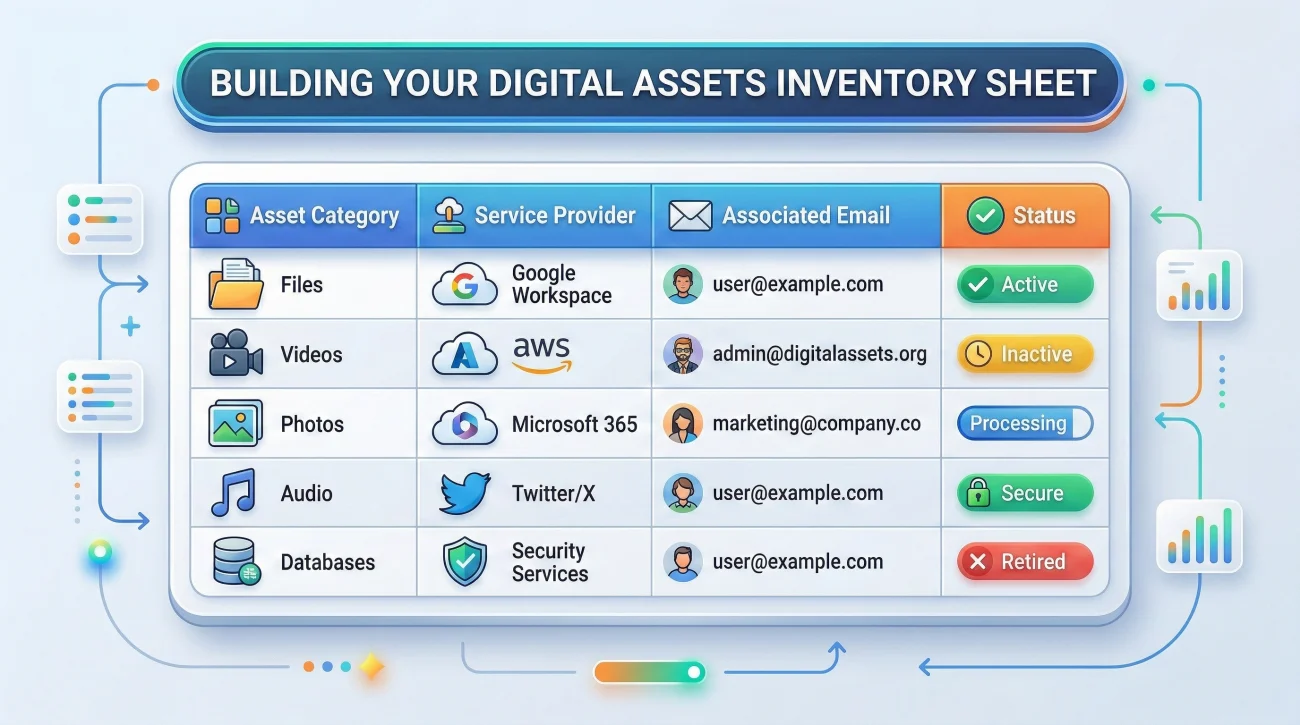
Building Your Digital Assets Inventory Sheet

When you are compiling all these clues, you need a centralized place to put them. Do not rely on scattered legal pads. Your tracking document should have distinct columns to capture the evidence without overstepping into unauthorized access.
- 📄 Asset Category: Hardware, cloud storage, crypto, wallet, or subscription.
- ✅ Service / Provider Name: The name of the company or the brand.
- 📄 Associated Email: The email address linked to the account. Do not put passwords here.
- ✅ Proof of Existence: How do you know it exists? (e.g., “Charge on Visa” or “Found device”).
- 📄 Status: Pending discovery, preservation hold requested, documents submitted, or closed.
- ✅ Institution Contact: The URL for the company’s estate department.
💡 Pro Tip: Treat the primary email address as the most critical piece of evidence you have. Almost all official correspondence initiated by customer support will route through the deceased’s primary email. Securing the device that is already logged into that email is the key to the entire process.
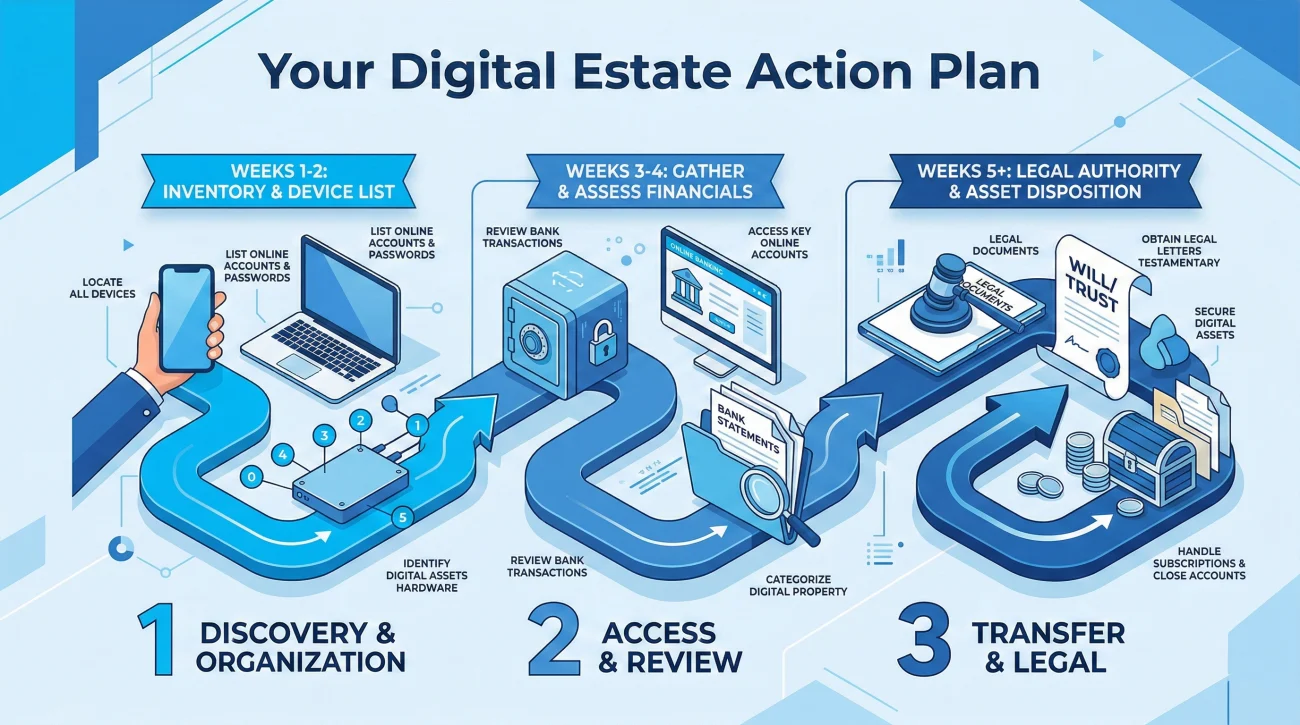
Your Digital Estate Action Plan
Hunting down digital assets is tedious, and it is easy to get overwhelmed by the sheer volume of online accounts. To keep things moving, I recommend breaking the work down into a prioritized timeline.
Days 1 to 3: Hardware and Preservation
Locate and secure all smartphones, laptops, and external hard drives. Keep the devices charged and ensure the cell phone plan remains active. Look for physical hardware wallets or seed phrases in safes and desk drawers.
Week 1: The Statement Map
Gather the last few months of financial statements. Highlight every recurring digital charge. Send preservation hold emails to critical cloud storage providers to ensure no family photos are deleted due to upcoming billing issues.
Weeks 2 to 4: Methodical Closure
Armed with your inventory sheet and your official executor documents, begin contacting the remaining subscription services, payment wallets, and social media platforms to close or memorialize the accounts systematically.
Reverse Planning: Do Not Leave a Digital Mess
If you are reading this while serving as an executor, you now know exactly how painful this process is. Use this experience to protect your own family. Take thirty minutes this weekend to set up legacy contacts on your Apple or Google accounts, configure emergency access on your password manager, and write down the location of your physical crypto backups. A little bit of digital estate planning today saves your future executor months of frustration.
❓ FAQ
📱 How do I get into a locked phone after someone dies?
You cannot bypass a modern smartphone lock without wiping the device. You must contact the manufacturer and submit a court order or death certificate to request legacy access.
💻 What should I do with a laptop I cannot log into?
Keep the laptop secure and powered off. Do not repeatedly guess the password, as this might trigger an automatic hard drive wipe. Focus on finding paper statements first.
🪙 How do I check crypto balances with a paper seed phrase?
Do not type those words into any website or app to check the balance. Phishing sites will steal the funds instantly. Log the paper securely and consult an estate professional.
📧 Can I legally read their private emails?
Being an executor does not automatically let you read private emails under tech company rules. You must request the email provider to grant access or provide an archive.
💳 How do I stop a subscription without the password?
Find the charge on a bank statement. Contact the service provider’s customer support, explain you are the executor, and provide the statement and death certificate.
☁️ Will cloud companies delete photos if billing fails?
Yes. If an account drops to a free tier due to non-payment, providers will eventually delete excess data. You must request a preservation hold immediately.
🔐 What if I already know their master password?
Logging in as the deceased person violates the terms of service and can complicate estate administration. It is safer to use official channels to notify institutions.
🕹️ Do airline miles or video games count as assets?
Usually, no. Most rules state that digital media and loyalty points are licenses that expire upon death. Check specific company policies to be sure.
🗑️ Should I delete their social media right away?
Do not delete them immediately. Check if the platform offers a memorialization option to freeze the account and keep the content visible for family.
📜 Do tech companies have to accept my executor papers?
While your papers grant authority, companies must also comply with privacy laws. They will require you to pass their specific legal review before granting access.
⚠️ Disclosure: I'm not an attorney and nothing on this site is legal or tax advice. The content covers process, organization, and workflow—the operational side of estate administration. For legal interpretation, jurisdiction-specific deadlines, contested situations, or tax matters, please work with a licensed professional in your state.