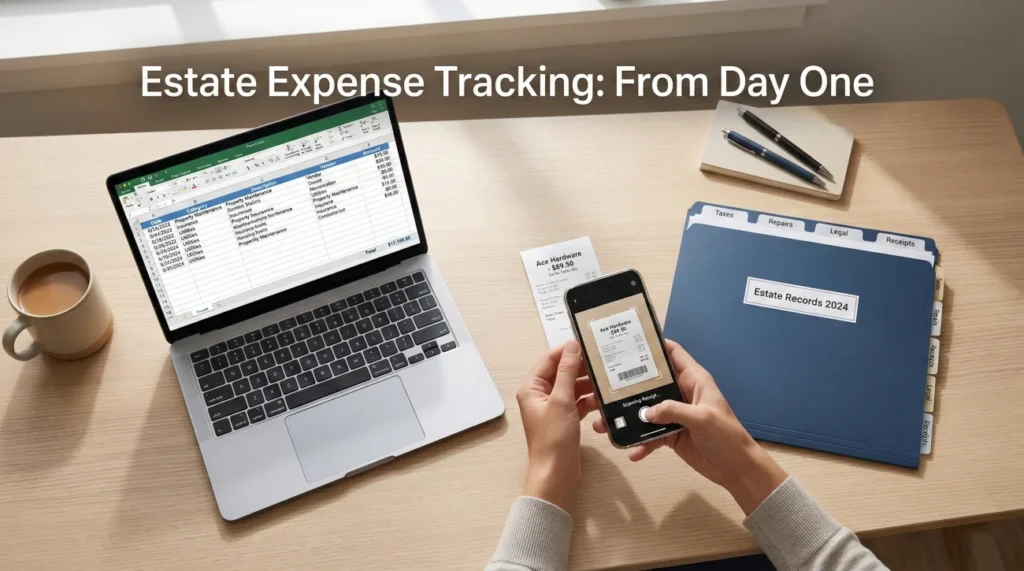
- An executor expense log is your best defense against confusion and family disputes over money.
- Physical receipts degrade quickly; digitize them immediately using a strict naming convention to preserve evidence.
- If you pay out of pocket before the estate account is open, tracking those details meticulously is the only safe way to handle reimbursements.
- Keep your tracking system simple: Date, Payee, Purpose, Category, Receipt Link, and Status.
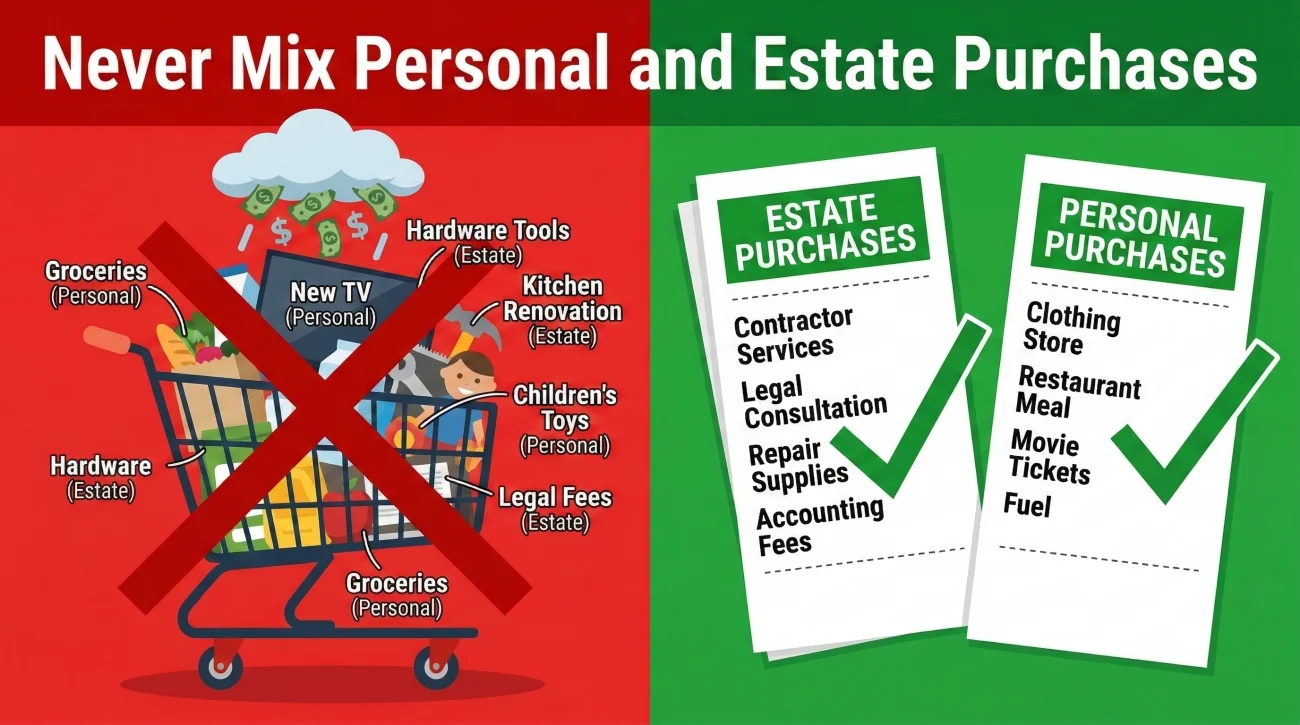
- Never mix personal and estate purchases on the same receipt, even if it saves you a trip through the checkout line.
Getting Ahead of Out-of-Pocket Estate Costs
In my time helping people navigate the heavy administrative work of closing out an estate, I have noticed a very predictable pattern. In the first few weeks after someone passes away, the priority is simply keeping things afloat. You might pay for extra death certificates out of your own wallet, put a utility bill on your personal credit card to keep the lights on at the house, or pay a clean-out crew to haul away junk.
Because there is so much going on, the paperwork usually ends up stuffed into a purse, a glovebox, or a literal shoebox on the kitchen table. The intention is always the same: “I will organize these later.”
But here is the operational reality: “later” turns into six months down the road. By that time, the ink on the thermal paper receipts has faded into a blank white strip. You can no longer remember if a $145 hardware store charge was for fixing the deceased’s front door or buying tools for your own garage. When it comes time to reimburse yourself from the estate funds, you find yourself guessing. And in estate administration, guessing is the fastest way to break trust with beneficiaries.
Setting up a clear, structured executor expense log from day one protects you from that exact scenario. When you have a solid estate reimbursement tracking system, you remove the emotion from the money and replace vague memories with hard evidence. In this guide, I will show you exactly how to build that system, what fields to track, and how to handle missing paperwork.
Key Point: Tracking expenses is not about proving you are honest; it is about making your actions completely transparent and easy to verify for anyone who asks.
Why Clean Logs Prevent “Trust Gaps”
When you step into the role of managing someone’s final affairs, you are handling money that ultimately belongs to the beneficiaries. Even in families that get along perfectly well, administration delays have a way of creating a “trust gap.” If a beneficiary sees a line item in an update that just says “House expenses – $500,” human nature often leads them to wonder exactly what that means.
Your estate accounting records should tell a story so clear that a stranger could read it and understand the exact sequence of events. When you are asked a question about spending, you do not want to rely on your memory. You simply share the log row and the attached PDF.
Let’s look at a practical example of how a poorly documented expense looks compared to a properly tracked one.
Logging a line in a notebook that says: “Paid $200 to Dave for yard work on the 14th.” No invoice attached, no context provided.
Logging an entry that says: “Oct 14 – $200 to Dave’s Landscaping – Bi-weekly lawn mowing at 123 Main St to comply with HOA rules – Receipt: 2023-10-14-DavesLandscaping.pdf.”
The “After” method answers every possible question before it can even be asked. It shows who was paid, how much, exactly why it was necessary for the estate, and where the proof is located.
The Core Fields Every Estate Expense Tracker Needs
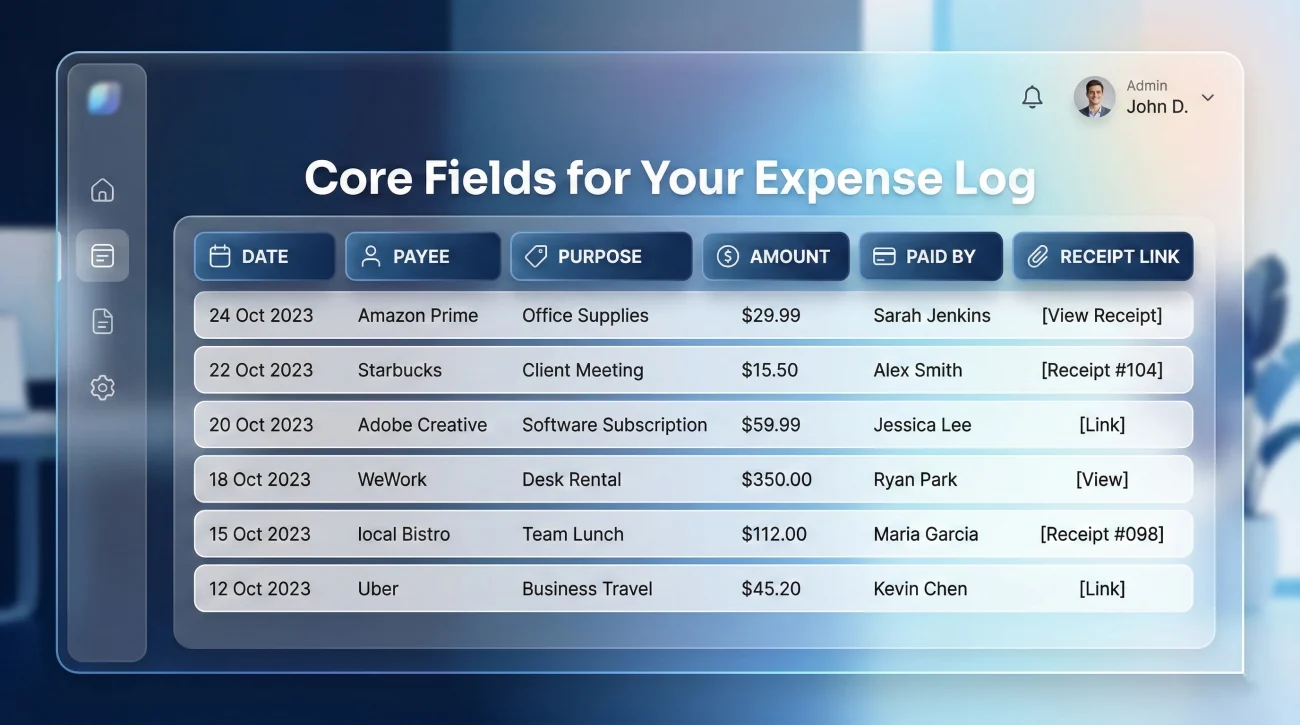
You do not need complicated accounting software to get this right. A simple executor expense spreadsheet is often the best tool for the job because you can customize it and easily email it to your professional advisors. Whether you use Excel, Google Sheets, or a physical ledger, your tracker must contain a few non-negotiable columns.
I recommend setting up your table with the following core fields. This structure ensures you capture the “who, what, when, why, and where” for every single transaction.
| Date Paid | Payee (Who was paid) | Purpose (Why it was needed) | Amount | Paid By (Source) | Receipt File Name |
|---|---|---|---|---|---|
| 2023-11-02 | County Vital Records | 10 official copies of death certificates | $150.00 | John Doe (Out of pocket – Needs Reimbursement) | 2023-11-02-VitalRecords-Certificates.pdf |
| 2023-11-15 | Edison Electric | Power bill for deceased’s primary home (Nov) | $85.50 | Estate Checking Account | 2023-11-15-Edison-PowerBill.pdf |
| 2023-11-20 | Smith Property Insurance | Renewed vacant home policy for 6 months | $600.00 | Estate Checking Account | 2023-11-20-Smith-HomeInsurance.pdf |
The “Purpose” Column is Your Defense
Do not just write “utilities” or “repairs.” Write “Electricity for main house to keep pipes from freezing” or “Locksmith to secure property.” I have seen many situations where a vague purpose line caused weeks of delay because a professional reviewer needed to verify the business necessity of the charge. A detailed purpose line ends the conversation immediately.
The “Paid By” Column Separates the Funds
This is where the actual tracking power lies. In the early days, you might be paying for things out of your own checking account. Later, you will be paying directly from estate funds. By clearly noting “Out of pocket – Needs Reimbursement” (as shown in the first row of the table above) versus “Estate Checking,” you create a flawless roadmap for settling up later.
Handling Out-of-Pocket Reimbursements Safely
Reimbursement is one of the most stressful parts of being an executor. You step up, you use your own money to keep things from falling apart, and then you have to figure out how to pay yourself back without making it look like you are taking advantage of the situation.
⚠️ Warning: I am not giving legal or tax advice here, and I cannot tell you which specific expenses your local laws allow you to be reimbursed for. Always check with your professional advisor to confirm what is allowed. My focus is entirely on how you document the process so that whatever is allowed is perfectly tracked.
When you need to be reimbursed, the golden rule is to never mix the funds. If you buy cleaning supplies for the deceased’s house, do not buy your own groceries on the same receipt. Make a separate transaction. It takes an extra sixty seconds at the register, but it saves hours of explaining later.
Communication is also key here. If you know you are going to be floating significant expenses for a while (like a mortgage payment or property taxes) before estate funds are accessible, it is often wise to let the beneficiaries know what is happening in writing.
Here is a neutral, professional script you can use to communicate this status:
Subject: Administrative Update: Out-of-pocket property expenses
Hello everyone,
I want to provide a quick update on the administrative process. We are currently waiting for the official estate accounts to be opened. In the meantime, the property taxes and electricity bill are due to prevent any penalties or shutoffs.
To protect the property, I will be paying these specific bills out of pocket this month. I am keeping a detailed log and saving all receipts. Once the estate account is fully operational and I have confirmed the proper procedures with our advisor, I will submit these documented expenses for reimbursement from the estate.
I will keep everyone posted on the progress. Let me know if you have any questions.
Best regards,
[Your Name]
Notice what this message does. It states the problem, provides the solution, promises documentation, and sets the expectation that a reimbursement will happen later. It is calm, factual, and leaves no room for assumptions.
Receipt Hygiene: Naming Conventions and Folder Structure
Your executor receipts checklist is only as good as the physical (or digital) proof backing it up. My operational rule for this is simple: the moment you are handed a physical receipt for an estate expense, take a photo of it with your phone. Do it in the parking lot before you even start your car.
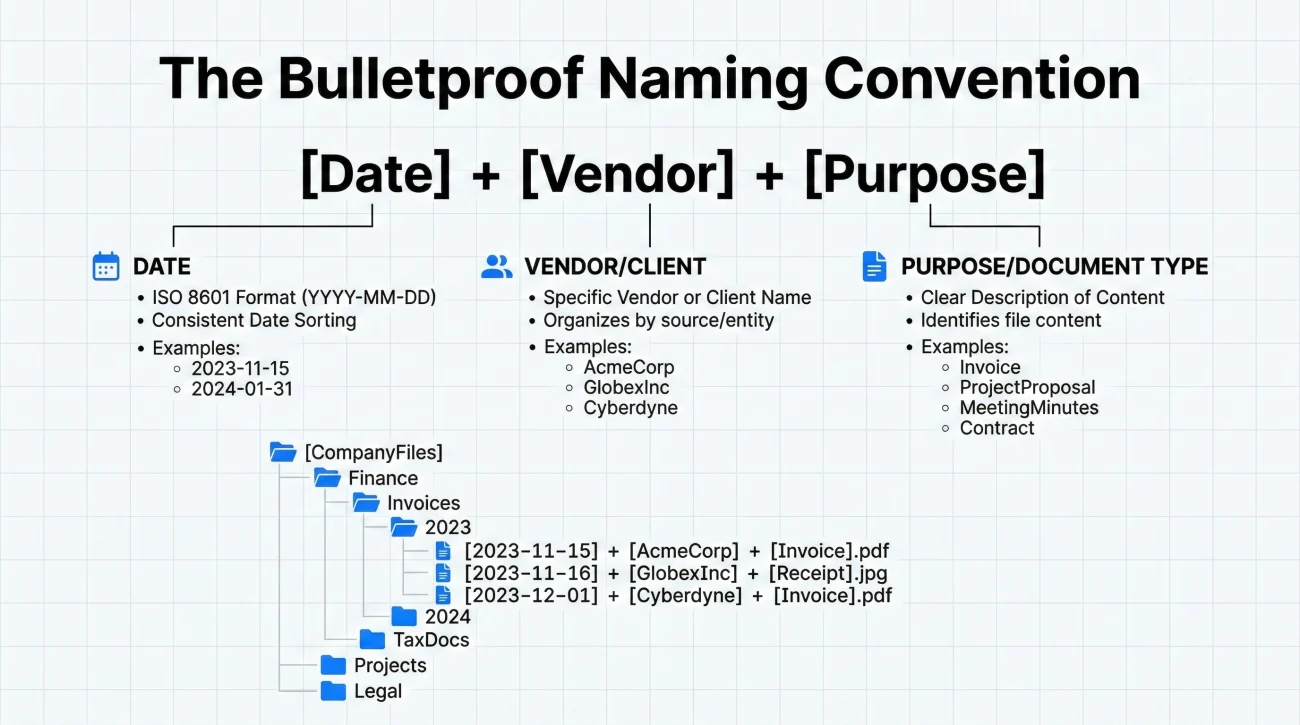
Once you have the digital copy, you need a naming convention. If you just leave the photos on your phone named “IMG_8472.jpg”, you will spend hours trying to match them to your spreadsheet later. Get into the habit of renaming the files immediately.
Here is the formula I strongly recommend for naming your digital receipt files:
[YYYY-MM-DD] + [Vendor Name] + [Short Purpose].pdf/jpg
| ✅ Good example | ❌ Bad example |
|---|---|
| 2024-02-14-HomeDepot-DoorLocks.pdf | receipt1.pdf |
| 2024-03-01-USPS-CertifiedMailPostage.jpg | hardware_store.jpg |
Building a Bulletproof Folder Structure
A good file name needs a good home. I recommend creating a dedicated folder on your computer to house these files so they do not get mixed in with your personal downloads. A clean folder structure looks like this:
Estate_Smith_2024 > Receipts and Invoices > [YYYY-MM] > [Your renamed files]
By grouping your receipts into monthly sub-folders (e.g., “2024-03”), reconciling your log against the monthly bank statement later becomes a quick, ten-minute task instead of a frustrating treasure hunt.
Handling Invoices vs. Store Receipts
It is worth noting the difference between a receipt and an invoice. You get a receipt at a cash register (like buying paint). You get an invoice from a professional (like a CPA or a contractor) requesting payment. When you log an invoice, save the original invoice document using the same naming convention, but add a note in your tracker’s “Status” column once the check clears. Both serve as proof, but invoices often contain the detailed breakdown of services that beneficiaries will want to see.
The Lost Receipt Workflow
If you lose a physical receipt before scanning it, do not panic and do not delete the entry from your log. Transparency is still the goal. Follow this simple three-step alternate proof workflow:
- Log the expense in your tracker immediately so the amount and date are recorded.
- Attempt to contact the vendor for a duplicate copy (many hardware stores and hotels can easily email this to you).
- If a duplicate is impossible, download your personal credit card or bank statement, redact all personal transactions, and highlight the specific line item for the estate expense. Save this redacted page as your proof and note “Statement proof only – Original lost” in your tracker’s purpose column.
Tracking Mileage and Non-Cash Expenses

One of the most common questions I hear from executors is about tracking the time and travel required to manage the estate. Driving back and forth to the deceased’s property, meeting with attorneys, and hauling donations can add up to hundreds of miles.
Whether you will eventually be reimbursed for mileage depends heavily on local rules and the language in the will. However, you cannot be reimbursed for miles you did not track. I always advise setting up a separate tab in your spreadsheet specifically for an “Executor Mileage Log.”
Keep this log just as rigid as your cash expenses. You should record:
- 📍 The exact date of the trip.
- 📍 The starting location and destination (e.g., “My home to Probate Court”).
- 📍 The total round-trip miles.
- 📍 The specific administrative purpose (e.g., “Filing the original will”).
Do not estimate your miles at the end of the month. Use a map application to get the exact mileage and log it the same day the trip happens. If your professional advisor later confirms that mileage reimbursement is allowed, you will simply multiply your total logged miles by the standard rate they provide. If it is not allowed, you simply do not submit the log. Either way, you have the data ready.
Connecting Your Expense Log to the Estate Account
Once you have your initial out-of-pocket expenses safely documented, your workflow will inevitably shift. The day you finally receive the official letters of authority and open the estate checking account, how you pay for things changes, but how you track them should not.
When you start writing checks or using a debit card linked directly to the estate, you must continue logging every transaction. Do not rely solely on the bank statements. A bank statement will show a $54.20 charge at a hardware store, but it will never explain why the estate needed to spend that money.
This ongoing tracking discipline is a vital piece of your broader organizational system. To understand how the expense log fits into the big picture of locating assets and preserving documents, you should review our comprehensive executor asset inventory guide. The inventory helps you find what the estate owns, while the expense log proves what the estate owes.
💡 Pro Tip: Reconcile your expense log with the estate bank statement at the end of every single month. Check off every line item to ensure the amounts match perfectly. Catching a missed entry is incredibly easy if you only have to look back 30 days.
Closing the Loop: Binders, Retention, and Handoff
Your expense log is not just a personal tool; it is eventually going to be an official deliverable. As you approach the end of the administration process, your CPA, the probate attorney, or the court itself will likely require an accounting of the estate’s finances.
This is where all your early discipline pays off. Instead of spending two weeks hunting down faded paper slips, you will simply export your completed spreadsheet and hand over your neatly organized digital folders containing the matched receipt PDFs.
Even after the estate is officially closed and funds are distributed, you must retain these records. Tax authorities or beneficiaries may have questions months or even years down the line. Keep your final, master expense log and the accompanying receipt files backed up securely on an external drive or cloud service. The peace of mind that comes from knowing you have an airtight, well-documented paper trail ready at a moment’s notice is the ultimate reward for doing this the right way from day one.
❓ FAQ
🧾 Do I need to keep physical receipts if I have a digital photo?
In most modern workflows, a clear digital scan or photograph is perfectly acceptable and often preferred because it won’t fade. However, it is a safe habit to keep the physical paper receipts in a labeled folder just in case a professional or institution specifically requests to see an original during the administration process.
📱 Can I use a regular app to track these expenses?
You can use an app if it allows you to export the data into a clear spreadsheet (like Excel or CSV) and allows you to attach receipt images. Avoid using closed apps where the data gets trapped. A simple spreadsheet is usually the safest, most universal way to share your logs with advisors later.
💳 What if I accidentally use my personal credit card for an estate expense?
If it happens, immediately log it in your tracker, clearly marking the “Paid By” column as your personal card. Save the receipt, write a note explaining the error on the physical copy, and consult your professional about how to handle the formal reimbursement from the estate account to correct the balance.
⚖️ What happens if beneficiaries still disagree with an expense after seeing the log?
If a dispute arises despite clear documentation, do not engage in a heated argument. Provide the log and the receipt, clearly state the administrative necessity of the expense, and refer the matter to the estate attorney to explain the legal standing of the charge to the beneficiaries.
🛒 How do I handle a receipt that includes both personal items and estate supplies?
If a mixed transaction occurs, highlight only the estate-related items on the physical receipt before photographing it. In your log’s purpose column, explicitly note “Split transaction – Estate items highlighted.” Only request reimbursement for the exact total of the highlighted items plus their proportional tax.
⛽ Should I track my own mileage when driving to the deceased’s house?
Yes, you should track the dates, mileage, and purpose of the trips in a separate mileage log. Whether or not you are legally allowed to be reimbursed for that mileage depends entirely on your local rules and the will, but capturing the data as it happens ensures you have the evidence if your advisor confirms it is allowed.
📎 How do I link a paper receipt to a spreadsheet row?
The simplest way is by matching the file name. Digitize the paper receipt and name the file something specific (e.g., “2023-10-14-Plumber.pdf”). Then, in your spreadsheet, type that exact file name into the “Receipt File Name” column. This creates an easy-to-follow map.
🗑️ What happens if I lost a receipt for something I already paid for?
Log the expense in the tracker immediately. Note in the “Purpose” or “Status” column that the physical receipt was lost. If possible, contact the vendor for a duplicate copy, or provide alternate proof like a redacted line item from your credit card statement showing the exact charge.
🤝 Should I share this expense log with the beneficiaries as I go?
While you should always ask your professional advisor about communication strategy, many executors find that sending a simple, high-level summary periodically reduces anxiety. Sharing the full line-by-line log is often done at specific accounting milestones, but the fact that you are tracking it gives beneficiaries peace of mind.
📅 When exactly should I start logging these expenses?
Start on day one. The moment you spend a single dollar related to the estate, even if it is just buying stamps to mail death certificates, write it down and save the receipt. It is much easier to delete a small expense later if your advisor says it doesn’t count, than it is to try and remember it six months from now.
⚠️ Disclosure: I'm not an attorney and nothing on this site is legal or tax advice. The content covers process, organization, and workflow—the operational side of estate administration. For legal interpretation, jurisdiction-specific deadlines, contested situations, or tax matters, please work with a licensed professional in your state.