- Secure the hardware immediately: Treat physical devices like the phone and laptop as the keys to the estate. Store them safely and do not tamper with security settings.
- Search for the master key: Before mapping individual accounts, look for signs of a password manager (like 1Password or Bitwarden) which can unlock the entire digital landscape at once.
- Map the footprint offline: Build a list of digital assets by reviewing physical bank statements and credit card bills for recurring tech subscriptions.
- Identify high-risk digital assets: Separate standard social media from time-sensitive business assets (like domains) and volatile assets (like cryptocurrency hardware wallets).
The Modern Executor’s Digital Roadblock
If you are managing an estate today, you are likely facing a challenge that executors from twenty years ago never had to think about: the digital wall. You have the deceased person’s smartphone sitting on a desk. It is buzzing with notifications, emails are arriving, and text messages are appearing on the lock screen. But when you try to open it, you are blocked by a passcode, Face ID, or a fingerprint scanner.
In my day-to-day work supporting executors, this specific moment is where I see the most anxiety. The instinct is to try and guess the password. I understand the urgency. You feel like the answers to the estate, including bank accounts, hidden debts, and contacts, are locked inside that small glass rectangle.
As an estate administration support writer, my primary goal is to help you navigate these hurdles calmly and methodically. Building a functional digital access after death checklist is not about hacking into devices. It is about preservation, documentation, and using the proper official channels to gain the information you need to settle the estate without breaking the rules or risking data loss.
Key Point: Your job right now is to secure the hardware and map out the digital landscape. The legal authority to manage the estate will eventually open the necessary doors through official channels.
To get started, we need to focus on the physical items sitting right in front of you.
Immediate Physical Steps: Securing the Hardware
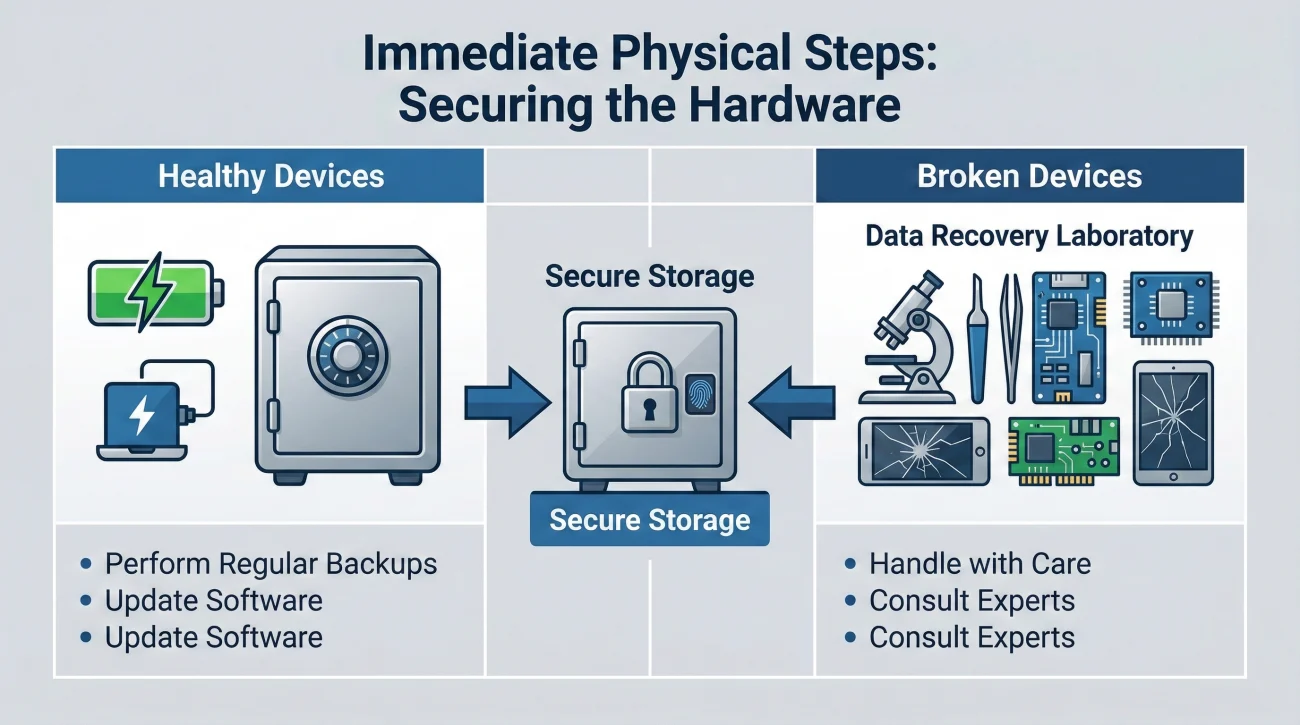
When someone passes away, their physical smartphone and laptop become highly critical pieces of the estate puzzle. The very first step in managing digital assets is strictly physical preservation.
A common pattern I see is a family member taking the deceased’s phone and handing it around the living room, letting everyone take a turn guessing the passcode. Modern smartphones are designed to protect user data aggressively. If you enter the wrong passcode too many times, usually around ten attempts, the phone may automatically execute a factory reset. If that happens, every localized photo, note, and two-factor authentication key is gone forever.
⚠️ Warning: Never attempt to unlock a device using the deceased person’s face or fingerprint. Aside from ethical concerns, many devices require a physical passcode after a period of inactivity or a restart anyway.
What to Do with Healthy Devices
Instead of trying to break in, take these practical steps to stabilize the situation:
- ✅ Keep it charged: Find the charger and keep the device powered on. If a phone dies and restarts, it will require a manual PIN code to decrypt the storage, locking down background functions.
- ✅ Listen and observe: Look at the notifications that pop up on the lock screen. Are there calendar alerts? Banking notifications? Emails from a specific accountant? Write these down.
- ✅ Secure it physically: Place the device in a secure location alongside other physical estate documents. Treat the phone with the same level of care as a birth certificate.
What if the Device is Broken?
Occasionally, an executor inherits a phone with a shattered screen or a laptop that will not power on. If you suspect crucial financial data is on a broken device, do not recycle it or take it to a standard mall kiosk repair shop. You will want to look for certified data recovery services. As a practical tip, look for established companies that offer “no data, no charge” guarantees and operate actual clean-room labs. Log the broken device in your inventory and wait until you have the estate’s funds to pay for professional, secure data extraction.
Once the hardware is safe, your next goal is to look for the single tool that could make your job incredibly easy.
Hunting for the Password Manager
Before you start tracking down dozens of individual accounts, look for the master key. Many people now use password managers like 1Password, Bitwarden, Dashlane, or LastPass.
If you can find the master password to one of these services, you instantly unlock the entire digital estate. In my workflow, finding a password manager changes the timeline from months down to weeks.
How do you find out if they used one? Look for an “Emergency Kit” document in their physical safe or filing cabinet. Services like 1Password encourage users to print out a piece of paper containing their secret key and master password. You should also check their physical keychain. Physical security keys, like a YubiKey, are small USB devices that people use to lock down password managers and high-value accounts. If you find a small tech device on their keyring, put it in a safe place immediately.
If you cannot find a password manager, you will need to map the accounts manually.
Mapping the Digital Footprint Offline
If you cannot get into the phone or laptop, how do you know what digital assets exist? This is where your physical paperwork becomes your best investigative tool. You can build a highly accurate digital assets checklist after death without ever logging into a single account.
I always advise executors to let the money tell the story. Almost every digital service leaves a financial footprint. By reviewing physical mail and paper bank statements, you can map out the digital life of the deceased.
💡 Pro Tip: Gather the last three to six months of bank and credit card statements. Grab a highlighter and look for recurring charges to Apple, Google, web hosting companies, or streaming services. Log every charge you find.
When you spot these, do not panic about canceling them today. Right now, you are just logging them. Write down the name of the institution, the date the charge usually hits, and the amount. This forms the foundation of your digital inventory.
Financial Tech and Cryptocurrency

Digital administration used to just mean closing a Facebook account. Now, it involves a wide variety of financial technology.
Before worrying about complex assets, note any everyday financial apps like PayPal, Venmo, or CashApp that appear on bank statements. These apps frequently hold floating cash balances that do not automatically sweep into the deceased’s main checking account. You will need to log these and contact their specific bereavement teams later to transfer the balances into the estate account.
Dealing with cryptocurrency requires a completely different approach because, unlike PayPal, there is no customer service line to call if you make a mistake.
If you find evidence of cryptocurrency exchanges like Coinbase or Kraken on bank statements, log them. These operate similarly to traditional banks. Once you have your court authority, you can contact their bereavement teams to transfer the funds.
However, the real risk lies in self-custody wallets. If you find a piece of paper with 12 or 24 random English words written on it, you have found a “seed phrase.” Treat this piece of paper exactly like you would treat a brick of solid gold. It is the direct access key to a crypto wallet. Similarly, if you find a small device that looks like a USB thumb drive with a tiny screen, usually branded Ledger or Trezor, this is a hardware wallet.
❌ Note: Do not attempt to move cryptocurrency yourself if you are not experienced. One wrong copy-paste of a wallet address will result in the permanent loss of the estate’s funds. Secure the seed phrases and hardware wallets in a safe deposit box and consult a professional when the time is right.
Identifying Digital Business Assets
Personal social media accounts can wait, but digital business assets are highly time-sensitive. If the deceased person ran a side business, a blog, a YouTube channel, or an Etsy shop, these platforms represent both income and potential liability.
Look for domain registration renewals like GoDaddy or Namecheap. If a domain registration expires, the website goes offline, and the estate could lose a valuable asset. If they had an active e-commerce store, there might be unfulfilled customer orders piling up. Add a special section in your inventory specifically for business accounts and prioritize them for action once your authority is granted.
But be prepared: whether you are dealing with a critical business domain or a simple personal email account, actually attempting to log in will almost certainly trigger the same frustrating security trap.
Navigating the 2FA Trap
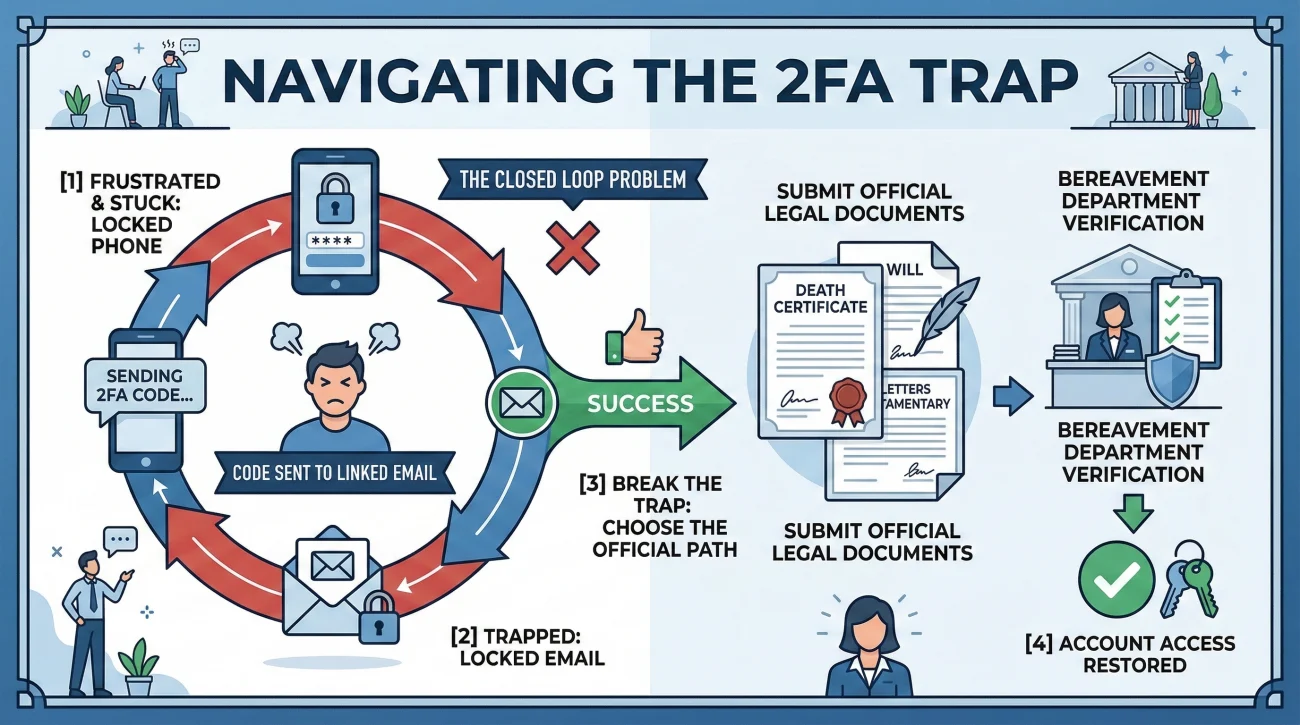
Once you start mapping out these accounts, you will inevitably hit the frustration of Two-Factor Authentication (2FA). Even if you find a notebook in the deceased person’s desk with all their usernames and passwords perfectly written out, you may still be locked out.
Here is what commonly happens: You go to a computer, type in the email address and the correct password. The screen loads, and then it says it just sent a 6-digit code to the mobile device. If the mobile device is locked, you cannot read the code. If you try to log into the mobile provider to check texts online, it sends a 2FA code to the email. It is a closed loop.
Clicking “Resend Code” twenty times, hoping it pops up on the lock screen, ultimately getting the account flagged for suspicious activity and permanently locked.
Acknowledging the 2FA barrier. Logging the account name on your tracker, stepping away, and preparing to contact the company directly with legal proof.
This is exactly why sequencing your actions correctly is so vital. Before you burn energy fighting automated security systems, you need to ensure you have stabilized the physical aspects of the estate. My Executor First Steps Checklist outlines exactly how to build your foundation before you start battling tech companies.
Official Recovery Routes and Specifics
The tech industry has finally realized that people pass away, and they have built official pathways to handle it. You do not need to impersonate the deceased to access email after death or close down accounts. In fact, doing so violates terms of service and can complicate your job.
Once you are officially appointed by the court, often called receiving Letters of Testamentary in the US or a Grant of Probate elsewhere, you will use specific bereavement channels. Here is how the major players actually operate in practice.
Apple and Google Operations
Both Apple and Google have formal processes, but they are strict. If the deceased proactively set up a “Legacy Contact” (Apple) or “Inactive Account Manager” (Google) before they passed, the process is streamlined for the designated person. You input the access key, and the data is provided.
If they did not set this up, the process takes much longer. You will submit your death certificate and court documents through their respective online privacy portals. Be prepared for a wait. Google’s review process is notoriously slow, often taking three to four weeks just for the initial review. Furthermore, Google rarely grants direct login access; if approved, they typically provide a secure link to download the deceased’s data. Apple is equally strict but focuses heavily on the legal wording. Often, Apple requires the court order to specifically state that the executor constitutes the “lawful consent” to access the Apple ID. General executor paperwork is sometimes rejected by Apple’s legal team, requiring you to go back to the court for an updated order.
Cell Phone Carriers
Dealing with cell phone carriers requires care. You often want to keep the phone number active for a few months because it is tied to 2FA for other accounts. However, you also need to prevent any unauthorized changes or account lockouts.
When you are ready to notify them, do not just call and say, “My husband passed away, what do I do?” That vague approach often leads to a frontline representative prematurely canceling the line. Instead, you want to be highly specific about your intent. Here is the exact phrasing I recommend using to keep the conversation on track:
Sample Call Script: Carrier Notification
“Hello, I am calling to notify you of the passing of the account holder, [Name], for phone number [Number]. I am the executor of the estate. I am not looking to cancel the line today, as we need it active to settle affairs. Can you please tell me exactly what documents your bereavement department requires to either transfer the billing responsibility to the estate or add me as an authorized manager, and where I should send them?”
Notice the structure of that request. In my day-to-day admin work, I always teach executors to follow this core communication formula with every institution so nothing gets lost in translation:
[Action] + [What you need in writing] + [Confirmation request]
By utilizing this formula, you force the representative to give you a concrete next step. Always ask them to email you the requirements rather than just taking notes over the phone. Getting it in writing prevents you from being given the wrong information by a customer service agent who might not fully understand probate rules.
Social Media Memorialization
Not every account needs to be deleted. For platforms like Facebook and Instagram, the family often prefers memorialization. This freezes the account, protects it from being hacked, and adds “Remembering” next to the person’s name.
You usually only need a link to an obituary or a copy of the death certificate to memorialize a Facebook account. However, professional platforms operate differently. LinkedIn does not have a memorialized state in the same way. You must report the deceased member using their specific form, and LinkedIn will permanently close and remove the profile.
To keep all these different rules straight, you need a timeline and a tracking system.
A Realistic Digital Timeline
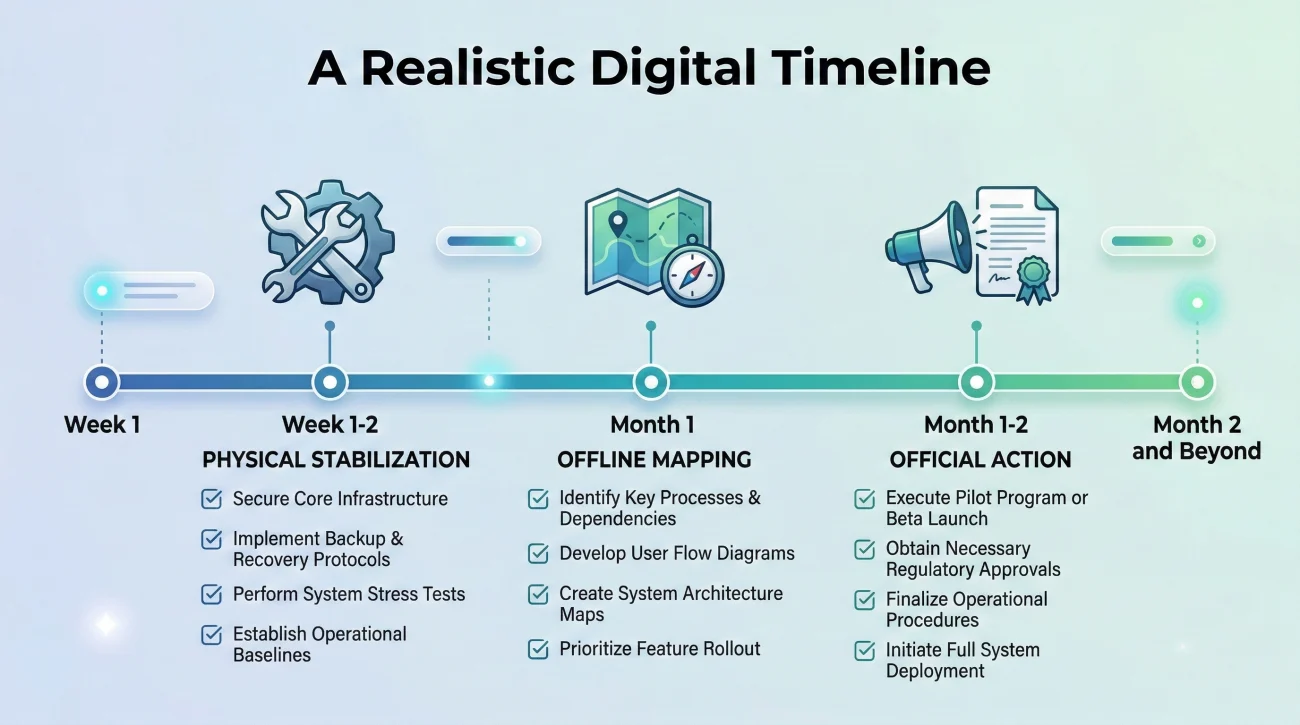
Executors often feel overwhelmed because they think they need to solve the digital puzzle immediately. In reality, digital administration should be paced out.
- 📅 Week 1: Physical Stabilization. Secure the phones, laptops, and hardware wallets. Keep devices charged. Do not guess passwords.
- 📅 Weeks 2 to 4: Offline Mapping. Review physical mail and bank statements to build your inventory spreadsheet. Look for the password manager emergency kit.
- 📅 Month 2 and Beyond: Official Action. Once the court grants your authority, begin submitting paperwork to Apple, Google, and the cell phone carrier. Cancel unnecessary subscriptions.
Mini-Template: Digital Account Inventory
To help you stay organized, here is a simple format you can copy into a spreadsheet. Keep this log updated as you discover new accounts or clues.
| Service / Asset | Account Clue Found | Action Needed | Status / Notes |
|---|---|---|---|
| iPhone 13 | Physical device | Keep charged, secure in safe | Plugged in; PIN unknown |
| 1Password | App on laptop screen | Search office for Emergency Kit paper | Pending search this weekend |
| PayPal | Transfers on bank statement | Request balance transfer to estate | Waiting for court letters to call |
| AT&T (Mobile) | Paper bill in mail | Transfer billing to estate | Waiting for court letters to call |
| Ledger Wallet | Device found in desk drawer | Secure physically, consult crypto pro | Locked in safety deposit box |
This simple habit of logging what you find without immediately trying to act on it will save you hours of frustration.
Final Thoughts on Digital Administration
Settling the digital side of an estate is a marathon, not a sprint. The systems built by tech companies are designed to keep people out, and they do their jobs very well. As an executor, your most powerful tool is patience.
By focusing on what you can control, like preserving the devices, mapping the footprint through paper trails, and keeping meticulous records, you position yourself for success. Do not let a locked screen make you feel like you are failing. It is a standard part of the modern process.
Finally, let this process serve as a reminder for your own planning. Take ten minutes today to set up your own Apple Legacy Contact or Google Inactive Account Manager. The executor who handles your affairs down the road will be incredibly grateful you did.
❓ FAQ
📱 What to do with phone after someone dies?
Place it in a secure, temperature-controlled spot like a safe. If it is a newer model, keeping it connected to Wi-Fi can sometimes allow background cloud backups to finish, but turn on ‘Do Not Disturb’ to prevent alarm and notification fatigue for the grieving family.
📧 Can an executor access email after death?
Yes, but you will almost always be forced through the provider’s privacy portal. You cannot simply call customer service and ask for a password reset. You will be required to upload high-quality scans of your legal authority and a certified death certificate for their legal team to review.
🔐 How do I get past two factor authentication after death?
You cannot bypass it technically. The solution is procedural. You bypass the 2FA system by moving the conversation to the bereavement department of the specific institution, who has the internal administrative power to disable the 2FA requirement once you prove your legal standing.
💻 What happens to a deceased person’s email account?
Most free email accounts, like Yahoo or Gmail, have inactivity clauses. If no one logs in for a certain period, usually 12 to 24 months, the provider will automatically purge the data and delete the account to free up server space.
🍎 How do I notify Apple of a death?
Navigate to Apple’s official Digital Legacy page. If you do not have a pre-arranged access key, be prepared that Apple may reject generic probate documents. They frequently require court orders to explicitly mention the Apple ID and your lawful consent to access it.
🌐 Do I need a court order to close digital accounts?
To simply delete a basic account like a streaming service or a forum profile, a death certificate is often enough. However, to extract data, transfer ownership of a domain name, or unlock financial tech accounts, official court appointment documents are almost universally required.
💳 How do I stop automatic subscriptions I can’t log into?
Attack the problem at the payment source. When the executor officially notifies the bank of the death, the bank will freeze the checking accounts and credit cards. This naturally halts recurring subscription charges because the payment method will decline.
📲 Can I just keep paying the deceased’s phone bill?
Yes, and it is usually a smart operational move. Paying the bill out of estate funds for the first few months ensures the number stays active, which is vital if institutions attempt to call the number or if you need to receive automated security texts while settling affairs.
💬 Can I read my deceased spouse’s text messages?
If the phone is unlocked, you can read the physical device. However, due to federal privacy laws like the Stored Communications Act, cell phone carriers will absolutely not provide transcripts of text messages to an executor without a highly specific, targeted court order.
📸 What happens to photos stored in the cloud?
Executors must act before the account is purged for inactivity or unpaid subscription fees. You must submit a request through the provider’s bereavement channel asking for a one-time data download link, which allows you to save the files to your own physical hard drive.
⚠️ Disclosure: I'm not an attorney and nothing on this site is legal or tax advice. The content covers process, organization, and workflow—the operational side of estate administration. For legal interpretation, jurisdiction-specific deadlines, contested situations, or tax matters, please work with a licensed professional in your state.